The true wireless stereo (TWS) earbuds market is becoming increasingly competitive. Improvements in active noise cancellation (ANC), audio drivers, and battery performance remain important, but brands also need product features that create a more distinctive user experience.
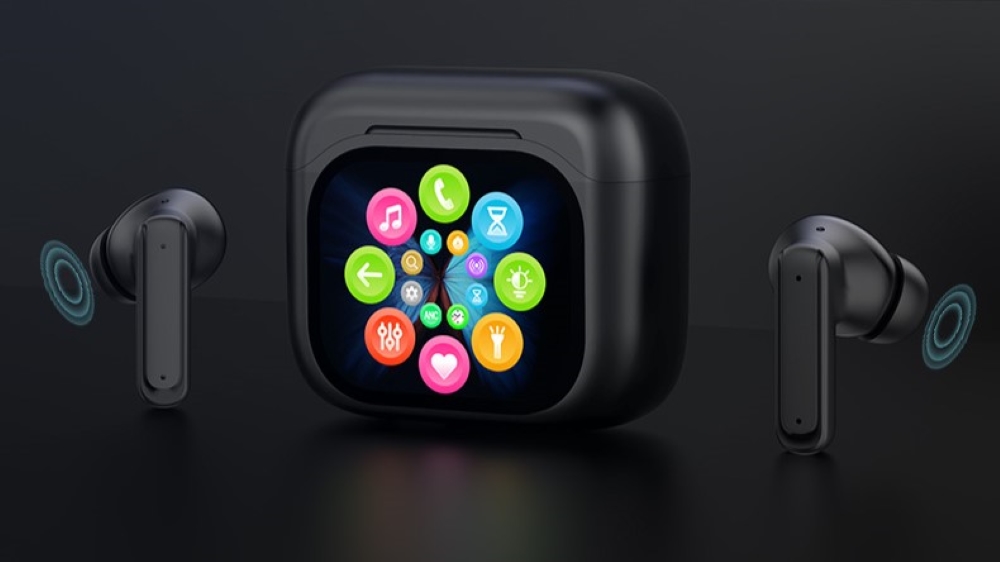
Full-color LED touch screen TWS earbuds offer another approach: integrating an interactive display into the charging case. Instead of relying entirely on a smartphone app or earbud touch controls, users can access selected audio functions directly through the case.
For audio brands, product managers, and private-label importers, the key question is whether a smart display charging case delivers practical value beyond its visual appeal.
The answer depends on how its features match real user needs. By prioritizing the right functions for commuting, sports, and office use, brands can develop smart display TWS earbuds with a clearer market position and more relevant user benefits.
1. What Makes a Smart Display Charging Case Different?
Traditional TWS earbuds typically rely on smartphone apps, physical buttons, or touch gestures on the earbuds for settings and playback control. These methods can work well, but accessing certain functions may require users to take out their phones or remember specific gestures.
A smart display charging case adds an interactive control interface to the charging case itself. Depending on the product’s hardware and software design, the display may provide access to playback controls, battery information, audio settings, and additional utilities.
For B2B brands, the potential advantages include:
- More accessible controls: Users can adjust supported settings directly on the charging case.
- Clear battery information: A visual interface can display the charge status of the earbuds and case.
- A differentiated product experience: The display provides a visible feature that can distinguish a product from conventional TWS models.
- More customization opportunities: Brands can evaluate interface layouts, supported functions, and visual design according to their target markets.
The actual feature set depends on the product architecture, display technology, firmware, and compatibility with connected devices. A smart screen should therefore be designed around useful functions rather than simply adding more menu options.
2. How Smart Display TWS Earbuds Fit Different User Scenarios
The most effective smart display features depend on where and how consumers use their earbuds. Commuters need quick audio adjustments, fitness users value accessible status information, and office users may prioritize sound settings and device connectivity.
2.1 Commuting: Quick Audio Controls and Environmental Awareness
Commuters often use TWS earbuds on trains, buses, and busy streets. Their smartphones may be stored in pockets or bags, making frequent phone access inconvenient.
A smart display charging case can provide a more direct interface for supported audio controls.
Recommended screen features
- ANC and transparency mode switching: Allow users to switch between noise cancellation and ambient sound modes when supported by the earbuds.
- Playback controls: Provide accessible track navigation and other supported media controls.
- Battery status: Display remaining battery information to help users plan charging.
- Simple touch navigation: Keep commonly used functions easy to locate and operate.
For example, a commuter may prefer noise cancellation on a train but need transparency mode when listening for announcements or becoming more aware of surrounding traffic.
The product design should make these adjustments straightforward without requiring users to navigate several layers of menus.
For brands targeting the commuter market, quick access to noise control and battery information can be strong starting points for defining the charging case interface.
2.2 Sports and Fitness: Battery Visibility and Convenient Utilities
During running, gym sessions, or outdoor activities, users may keep their smartphones in a gym bag, waist pack, or armband. Frequent interaction with a phone can interrupt a workout.
A smart display charging case can support convenience-focused features, although its practical value depends on whether users carry the case during exercise.
Recommended screen features
- Earbud and case battery indicators: Show the available charge for each earbud and the charging case, where supported.
- Timer and stopwatch: Provide basic timekeeping functions for workouts.
- Find-my-earbuds assistance: Offer supported locating or audio alert functions when the earbuds are misplaced.
- Clear, accessible interface: Use readable icons and straightforward navigation.
Battery visibility can help users understand their charging status before exercising. Timer and stopwatch functions may also add value for consumers who prefer simple utilities within the same product ecosystem.
Durability is another consideration for fitness-oriented products. Brands should assess the charging case’s surface resistance, drop protection, touch responsiveness, and exposure to sweat or moisture.
Water resistance should be specified and tested at the product level. A protective case or screen cover may improve durability, but it does not independently establish a particular IP rating.
2.3 Office and Remote Work: Sound Settings and Device Connectivity
Office workers, remote employees, and students may use TWS earbuds for music, online meetings, video calls, and focused study. They often want to adjust audio settings without interrupting their workflow.
A smart display charging case can provide an additional interface for supported audio and connectivity functions.
Recommended screen features
- Equalizer presets: Allow users to select available sound profiles, such as bass-focused, vocal-focused, or balanced modes.
- Audio setting shortcuts: Make frequently used adjustments easier to access.
- Connection status: Show relevant Bluetooth pairing or connection information.
- Device switching controls: Support switching between devices when the earbuds’ Bluetooth architecture and firmware allow it.
For example, a user may prefer a bass-focused profile for music and a more vocal-focused profile for spoken content. A display interface can make these presets easier to access if the earbuds support the relevant audio processing.
Multi-device switching requires more than a touchscreen. Brands should confirm that the Bluetooth implementation, firmware, and device compatibility support the intended switching experience.
For office-oriented TWS products, the goal is to reduce unnecessary interaction while keeping the interface simple enough for everyday use.
3. Smart Display TWS Earbuds: Feature Priorities by Scenario
The following framework can help product teams define a feature roadmap for different target markets.
| Use Scenario | Primary User Need | Recommended Display Features | Product Design Priority |
|---|---|---|---|
| Commuting | Quick audio adjustments | ANC and transparency controls, playback, battery status | Fast access and simple navigation |
| Sports and fitness | Convenient status checks | Earbud battery indicators, timer, stopwatch, supported locating features | Readability and durability |
| Office and remote work | Efficient audio management | EQ presets, connection status, supported device switching | Intuitive controls and compatibility |
These priorities are starting points rather than universal rankings. Actual demand should be validated through target-market research, user testing, and product feedback.
For B2B buyers, this framework can help connect feature selection with product positioning, development costs, and the intended retail audience.
4. How to Evaluate Smart Display Charging Case Durability
A touchscreen introduces additional design considerations compared with a conventional charging case. Brands targeting active users should assess the display cover, enclosure, touch interface, and overall protection as a complete system.
Screen Cover and Scratch Resistance
The screen cover material influences surface durability, optical clarity, appearance, and touch performance. Depending on the design, manufacturers may evaluate suitable glass or plastic cover materials.
Hardness ratings should be interpreted carefully because different testing methods measure different properties. A stated 9H pencil-hardness result, for example, should not automatically be interpreted as a Mohs hardness rating or proof of resistance to every type of scratch.
Before confirming specifications, buyers should review the test method, sample configuration, and relevant product documentation.
Water and Sweat Resistance
Sports-oriented products may encounter sweat, splashes, or humid conditions. The required protection level should be determined by the intended application and verified through appropriate testing.
An IP rating applies to the tested product configuration under defined conditions. Buyers should confirm whether the rating covers the charging case, the earbuds, or both, and should not assume that a protective sleeve alone establishes water resistance.
Drop Protection and Touch Responsiveness
Protective bezels, enclosure design, and suitable accessories may help reduce damage from accidental impacts. However, the overall result depends on the complete mechanical design and test conditions.
Touch responsiveness should also be evaluated under realistic usage conditions. Interface size, icon spacing, screen sensitivity, and the placement of frequently used controls can affect usability.
For brands developing private-label smart display TWS earbuds, durability targets should be documented alongside appearance, functionality, and cost requirements.
5. Key Product Definition Questions for B2B Buyers
Which screen features should be prioritized for commuting?
ANC and transparency mode controls, playback shortcuts, and battery status are logical candidates because they address common convenience needs. The final priority should reflect the target market and the audio functions supported by the earbuds.
Is a full-color touchscreen charging case suitable for sports products?
It can be suitable when the design meets the intended product’s durability and usability requirements. Brands should evaluate scratch resistance, drop protection, moisture exposure, touch responsiveness, and whether users are likely to carry the case during exercise.
Does a smart display charging case replace a smartphone app?
Not necessarily. The display can provide direct access to selected functions, while a smartphone app may still be needed for advanced settings, firmware updates, or features not implemented on the case.
The two interfaces should complement each other rather than duplicate complex menus unnecessarily.
Can brands customize the display interface and features?
Customization depends on the manufacturer’s hardware platform, firmware capabilities, and development scope. Potential discussion points include screen layout, supported controls, battery information, EQ presets, language options, and brand-specific visual elements.
B2B buyers should confirm which features are already supported, which require software development, and which may affect cost, schedule, or certification requirements.
6. A Practical Checklist for Sourcing Smart Display TWS Earbuds
Before selecting a smart display TWS model for wholesale or private-label development, buyers should evaluate the following areas:
- Core audio specifications: Confirm ANC performance, audio quality, microphone functions, and supported Bluetooth features.
- Display capabilities: Verify screen size, resolution, touch responsiveness, interface design, and supported functions.
- Battery performance: Review earbud and case battery capacity, charging methods, and usage expectations.
- Software and connectivity: Confirm compatibility with intended devices and validate any multi-device switching requirements.
- Durability: Request relevant scratch, drop, moisture, and functional test documentation.
- Customization scope: Clarify available options for appearance, interface, packaging, and firmware.
- Commercial requirements: Confirm minimum order quantities, development costs, lead times, quality inspection, and applicable compliance documentation.
This checklist helps brands distinguish between features that are already available and capabilities that require additional engineering.
Conclusion: Design Smart Display Features Around Real User Needs
Full-color LED touch screen TWS earbuds offer brands a way to differentiate their products through a more accessible charging case interface. Their value, however, depends on the usefulness of the functions rather than the presence of a screen alone.
Commuting-oriented products can prioritize audio mode switching and battery information. Fitness-oriented models can focus on status visibility and convenient utilities, while office-oriented products may benefit from audio presets and supported connectivity controls.
For audio brands, product managers, and private-label importers, the next step is to define the target user, select the most relevant display features, and verify technical feasibility before finalizing the product specification.
A well-designed smart display charging case should make everyday controls easier to access while supporting a clear, differentiated product position in the competitive TWS earbuds market.